DrawPic

Generate and rework images with several hosted AI models.

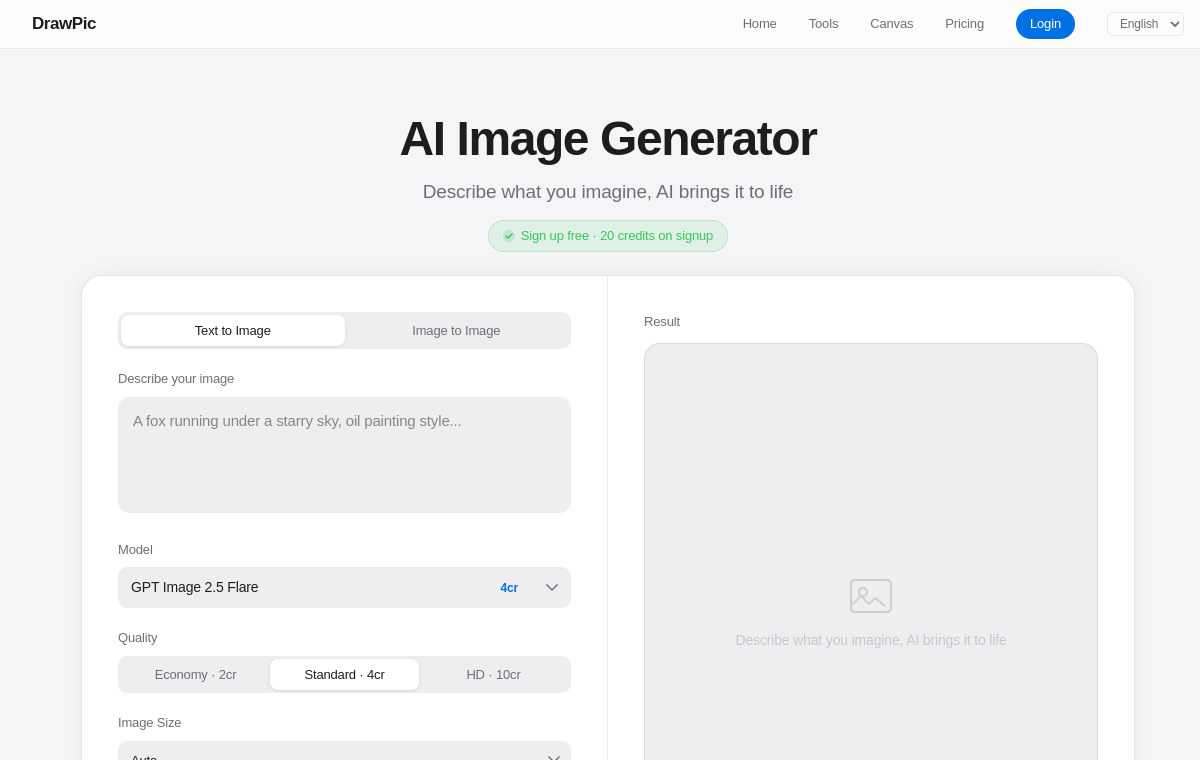
DrawPic website preview

Introduction

DrawPic is a bilingual online image workspace with text-to-image and image-to-image modes. Users pick a model and a quality level, describe or upload a reference, and generate at common aspect ratios. New accounts receive free credits, and the interface is available in Chinese and English.

Key Features

  • Text-to-image and image-to-image modes
  • A choice of hosted AI models
  • Quality and aspect-ratio controls
  • Multiple reference image uploads
  • Chinese and English interface

Who is it for

  • Designers creating concept images
  • Marketers producing visuals
  • Ecommerce sellers building product imagery

What can you do with

  • Generate an image from a written description
  • Rework an uploaded image with a reference
  • Produce visuals at a chosen aspect ratio

How does DrawPic work

  • Describe the image or upload a reference
  • Choose a model and quality level
  • Set the aspect ratio
  • Generate and download the result

Pricing

  • Check the official website for current pricing and plan details.

More products

View category
TattooDraftsTattooDrafts collects practical preparation tools for tattoo work. It covers lettering and font generation, Roman numerals, stencil creation, placement previews, price and pain references, and a design feasibility check. Artists and clients can use it to sketch out an idea before a studio session. Key Features Lettering and font generation Roman numeral and stencil tools Placement previews Price and pain reference charts Design feasibility check Who is it for Tattoo artists Clients planning a design Studio staff preparing quotes What can you do with Explore lettering and font options Create a stencil or placement preview Check an idea before booking studio time How does TattooDrafts work Pick the prep tool you need Enter the name, placement, or design details Preview the result Run the feasibility check before a session Pricing Check the official website for current pricing and plan details.Z ImageZ Image offers a hosted version of the Z-Image Turbo model with prompt and aspect-ratio controls. It targets photorealistic images and bilingual poster layouts, so users can iterate on visuals without running the model themselves. The site also documents local FP8 and GGUF setups for people who want to run Z-Image Turbo on their own hardware. Key Features Hosted Z-Image Turbo generation Prompt and aspect-ratio controls Photorealistic image output Bilingual poster layouts Local FP8 and GGUF setup documentation Who is it for Image creators and prompt designers Poster and layout designers Users who prefer to self-host models What can you do with Generate photorealistic images online Compose bilingual poster layouts Follow a local setup guide for your own hardware How does Z Image work Write a prompt and choose a ratio Generate the image Adjust and regenerate as needed Or follow the local FP8 or GGUF setup guide Pricing Check the official website for current pricing and plan details.PixelMCPPixelMCP connects several image generation models to any MCP-capable chat client. Instead of managing separate subscriptions, users draw from one credit balance to reach models such as Nano Banana, GPT Image, and FLUX while staying inside their existing assistant. It works with clients such as ChatGPT, Claude, Gemini, and Cursor. Key Features MCP access inside supported chat clients Multiple image models behind one interface Single shared credit balance Works with tools such as ChatGPT, Claude, Gemini, and Cursor Who is it for Chat users who want image generation in place Teams avoiding separate model subscriptions Developers using MCP clients What can you do with Generate images without leaving your chat client Switch between several image models Track usage through one credit balance How does PixelMCP work Connect PixelMCP to an MCP-capable client Choose a supported image model Send the request from your chat Spend credits from the shared balance Pricing Check the official website for current pricing and plan details.Cursive Text GeneratorCursive Text Generator converts ordinary text into cursive, script, and calligraphy styles using Unicode characters. Results can be copied into social bios, captions, documents, or usernames, and the site also lists matching fonts for people who need a real typeface rather than pasted characters. No signup is required. Key Features Unicode-based cursive and calligraphy styles Copy-and-paste output Support for social bios, captions, and usernames A listing of matching cursive fonts Who is it for Social media users styling bios and captions Designers looking for cursive typefaces Anyone needing decorative text in a document What can you do with Convert plain text into a cursive style Paste styled text into a bio or caption Find a matching font for a design How does Cursive Text Generator work Type the text you want to style Choose a cursive or calligraphy style Copy the converted characters Paste them into the target app or profile Pricing Check the official website for current pricing and plan details.Cursive GeneratorCursive Generator is a small web tool for cursive and decorative text. Type a phrase, choose a styling option, and either copy the stylized characters or download a PNG. The site frames the output for wedding invitations, posters, social bios, and product mockups. Key Features Cursive and decorative text styles Copyable Unicode output PNG download for designs Uses such as wedding fonts, posters, and Etsy artwork Who is it for Event and wedding designers Social media users Etsy sellers and product mockup makers What can you do with Style a phrase in a cursive font Copy the text for social profiles or documents Download a PNG for a print or product design How does Cursive Generator work Type your phrase Pick a styling option Copy the text or choose PNG download Use the result in your profile or design Pricing Check the official website for current pricing and plan details.StampZenStampZen is a browser stamp maker for company seals, notary marks, rubber stamps, and date stamps. It focuses on quick design without specialist software, using templates and a pay-only-when-you-order model. The design step is free, and print-ready transparent PNG, SVG, or PDF files are purchased when needed. Key Features Templates for company seals, notary, rubber, and date stamps Browser-based design with undo and redo Free JPG previews Paid print-ready PNG, SVG, or PDF output Who is it for Small businesses Notaries and legal offices Event organizers needing custom stamps What can you do with Design a company seal or rubber stamp online Preview the stamp before paying Order a print-ready file for production How does StampZen work Pick a stamp template Customize the text and layout Preview the design for free Buy and download the print-ready file Pricing Check the official website for current pricing and plan details.AI Signature GeneratorAI Signature Generator helps people design a personal signature by generating options, typing a name, or drawing one by hand. The finished mark can be reused for contracts, forms, and documents, which helps when a consistent digital signature is needed. Previews are free, while paid packs unlock clean downloads. Key Features Generated, typed, and hand-drawn signature options Free preview of the result Paid packs for clean downloads Reusable output for contracts and forms Who is it for Professionals signing documents Freelancers and small business owners Anyone needing a consistent handwritten signature What can you do with Explore several signature styles for a name Draw or generate a personal signature Download a clean version for documents How does AI Signature Generator work Enter the name to sign Generate, type, or draw an option Preview the signature for free Unlock a clean download with a paid pack Pricing Check the official website for current pricing and plan details.Re-DesignRe-Design is an AI studio for interior concepts. Upload a photo of a room, describe the direction you want, and generate visualizations that show how the space could look. It helps people test styles and gather references before hiring a designer or ordering furniture. Key Features Room photo upload Text-described design direction Generated interior visualizations Fast style exploration Who is it for Homeowners planning a renovation Interior designers gathering concepts Renters testing layout and style ideas What can you do with See a room restyled in several directions Compare visual concepts before committing Collect references for a designer or contractor How does Re-Design work Upload a photo of the room Describe the style or changes you want Generate the redesign visualization Compare options and save the ones you like Pricing Check the official website for current pricing and plan details.

Want more people to discover your product?

List your product and help people discover useful AI for work. Choose Free review or a paid listing plan.

Submit